AI AGENT GOVERNANCE · ON-DEVICE

Govern AI agents where they actually run.

Your policy allows, refuses or escalates every agent call to files, keys, shell and network, logged and tamper-evident.

DECIDED PRE-ACTION · 24H
2,481 calls
checked by deterministic policy, not by another model
AUDIT TRAIL
Every decision, replayable
tamper-evident log, step-by-step replay, SIEM export
REFUSED · BEFORE IT RAN
Cursor tried to read ~/.ssh
rule “no credentials” · 6 refused today
DRIFT · 04:12
A setting changed
settings.json no longer matches what you approved

DEMO DEVICE · SYNTHETIC DATA

Held, not blocked

A risky action waits with the rule that caught it named. Someone releases it with a reason and Touch ID, or security decides for the team.

Keep an audit trail

Every decision is logged on the device with its session and process chain, ready to replay.

Catch configuration drift

Approved configs are fingerprinted. A change is flagged by file and time at the next scan.

The problem

Agent access adds up.

No company sets out to give AI agents unrestricted access to its systems. It happens one reasonable decision at a time, and teams rarely see when those permissions add up to more access than intended.

The prompt trains you to say yes.

Each approval is sensible on its own. By the fortieth, "allow for this session" becomes "always allow", and nobody looks at it again.

SYNTHETIC CONFIG · ONE GRANT, MADE PERMANENT

The allow list only grows.

Cleaning it up doesn't hold. New grants arrive as you work, and nothing flags the one that widens what an agent can do. The file records what was allowed, never when or why.

SYNTHETIC CONFIG · NOTHING FLAGGED IT

A deny rule is advice.

A rule blocking sqlite3 means little when the same list lets an agent run any Python it writes. Python opens the database just as easily.

38 "deny":  [
39   "Bash(sqlite3 *)"
40 ],
41 "allow": [
42   "Bash(python3 -c *)"
43 ]
SYNTHETIC CONFIG · LINE 42 SUBSUMES LINE 39

How control works

Measure. Implement. Enforce. Watch.

Four steps, in order. Mockingbyrd proposes; you decide at every one.

01 · MEASURE

Score each machine

Doctrine Scan checks every agent it can see from disk against the rule pack, weighted by severity, with evidence for each check.

You decide: which findings matter.

02 · IMPLEMENT

Review the fix

Every fixable finding comes with a script you can read first. Nothing runs until you approve it.

You decide: which scripts run.

03 · ENFORCE

Check each call

Guard reads the command that will run and applies your policy before it executes. Block, allow once, or allow for N minutes.

You decide: the calls policy does not cover.

04 · WATCH

Flag what changed

Drift Watch fingerprints settings.json, the guard hook and CLAUDE.md, and keeps 60 scans of history.

You decide: accept the change or roll it back.

THE ROSTER · 8 CAPABILITY TYPES

See your agents and what each one can access.

Sessions, subagents, scheduled jobs, connectors — the roster names which kind each one is rather than flattening them, and fills a cell only from something on disk: a permission entry, a profile, an agent definition, a scheduled job, a connector declaration.

The combinations that matter are named underneath each one: reads widely and can send off the machine, runs arbitrary code, runs unattended while nobody is watching.

The eight are files, shell, code runners, network, delete, secrets, originals and connectors, ordered by consequence — what each column means is on the Agent Roster page.

Connectors enabled in the web app are configured server-side, so a locally declared list is a floor, not the whole picture. The roster says that on the screen rather than in a footnote.

DEMO MACHINE · SYNTHETIC AGENTS
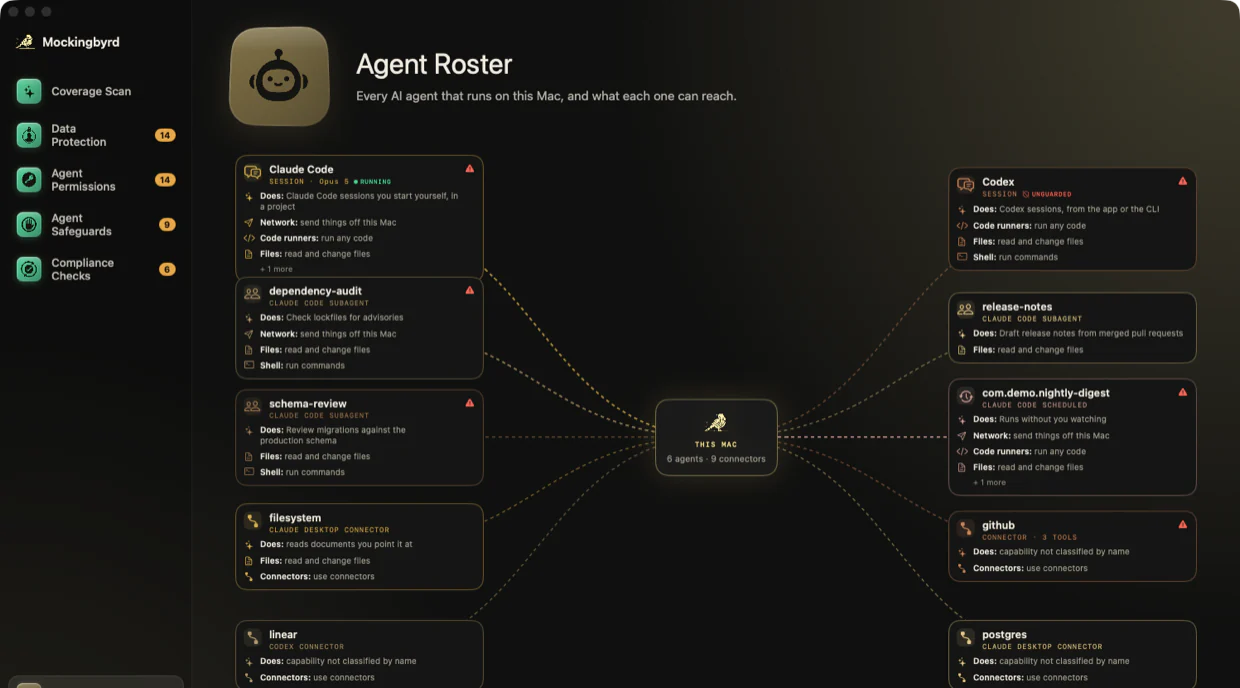
The Agent Roster: six agents and nine connectors wired to a hub marked This Mac, each card listing what that agent can reach.

What you get

Six capabilities, and what each one changes.

A score, not a checklist

Controls are weighted by what they cost you when they fail, so the number moves for reasons you can name. Every check shows its working.

Fixes you read first

No silent remediation. The change is written to disk as a script you can open, before anything runs it.

Enforced below config

A command that reaches for an original stops before it runs, not after — and you are asked, with the command in front of you.

Pause that actually pauses

It takes effect on the next call and resumes itself. The log keeps running throughout, so a paused window is visible afterwards rather than a gap.

Drift you'd otherwise find late

Fingerprints on the files that matter. A control that quietly stopped holding is an event, not something you discover in a quarterly review.

Your doctrine, not ours

Ships with one rule pack. Every rule is a shell probe you can edit, weight, disable or replace — write your own and the score follows.

THE LEDGER · READ LOCALLY, SENT NOWHERE

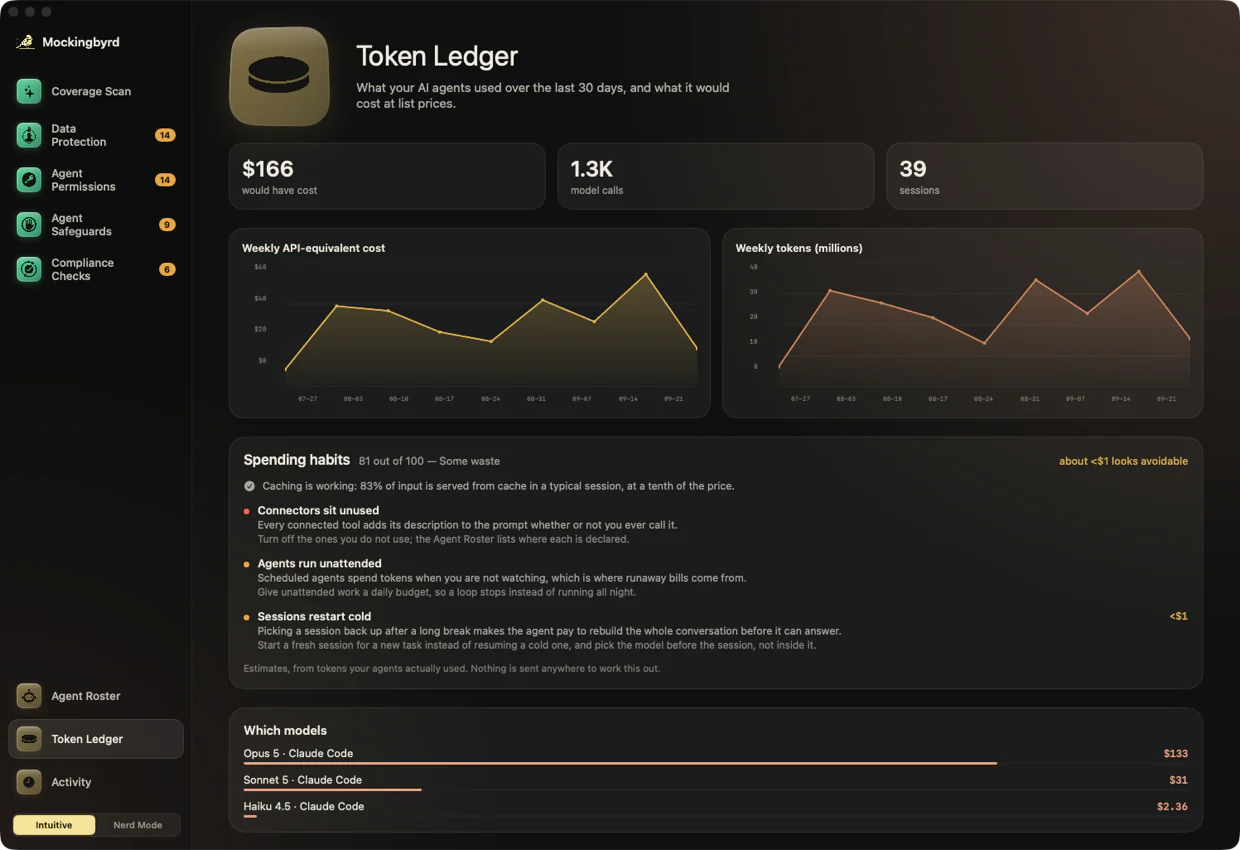
See what your agents cost, using data already on your system.

Token use and API-equivalent spend by model, by project, by week — read from the session logs your agents already write. Producing it sends nothing anywhere.

It scores the waste too: whether caching is working, connectors that sit unused while adding their description to every prompt, agents spending unwatched, and sessions picked up cold when a fresh one would have been cheaper.

It is not a bill. Consumer Claude and ChatGPT subscriptions are not billed per token — this is what the same traffic would have cost at list prices, which is a sense of proportion rather than an invoice.

DEMO MACHINE · SYNTHETIC SESSIONS

The Token Ledger: API-equivalent cost, model calls and sessions, with weekly charts and a breakdown by model and project.

Score your settings without installing anything.

Paste your Claude Code settings.json to see your score. Your file stays in your browser and is never uploaded. The page blocks network connections and shows you how to verify this in your browser’s Network tab.

The engine

One engine. A complete view of your agents.

See what your agents can access, set boundaries for their work, and keep a record of what happens.

Agent Roster

Every agent we can see from disk, and what each one can reach.

Learn more →

Doctrine Scan

A weighted score built from evidence on disk, not a row of green ticks.

Learn more →

Drift Watch

Approved configs are fingerprinted. A change is named by file and time at the next scan.

Learn more →

Data Shield

Agents work on copies. Deletions are never delegated, and a backup is confirmed before anything changes.

Learn more →

Token Ledger

What the agents cost, by person, model and week, rebuilt from session logs already on the disk.

Learn more →

Agent Access

What an agent may reach in one session, and which combinations need a second pair of eyes.

Learn more →

Guard

Holds a risky command below the permission list. Claude Code today; Codex, Cursor and Gemini CLI next, including their skip-permission modes.

Learn more →

Spend Optimizer

Nine waste detectors, and caps per session, per day and per unattended run.

Learn more →

Teams console

One rule set pushed to every machine, approvals that round-trip to a person, and drift raised as an event rather than found later.

Learn more →

Guard below the permission list

Enforcement at the operating system rather than on hooks. Opens when Apple grants the Endpoint Security entitlement.

Learn more →

Procurement set

Signed audit export, SSO, SCIM and SIEM export, with a SOC 2 report behind them. Opens with the first team whose review asks for it.

Learn more →

Verified savings

Billed on measured, incremental savings against a baseline you can audit. Opens only once the savings test clears on real bills.

Learn more →

Who it is for

The first security hire

One rule set across the agents your developers already run, in week one.

For security →

Staff engineers

Held, not blocked. The rule that caught it is named, and you release it yourself.

For developers →

Finance

What the agents cost by person, model and week, and which spend bought nothing.

For finance →

Engineering leads

One doctrine across the fleet, and evidence when a control stops holding.

For teams →

Small sensitive-data firms

Agents running over mail, documents and portfolio data, with no security team behind them.

Read more →

Questions before you install

Questions before you get started.

Including where the controls stop.

Does anything leave my device?

Nothing it measures. Scans, the guard and the token ledger read files already on disk, and no scan result and no file content is ever sent anywhere. Five things can leave, and each is yours to switch on or off: an update check at launch, which fetches one static file and carries no identifier; a price-list update you trigger yourself; crash reporting, which is off until you turn it on and then sends a stack trace with no identifier for you or your machine; activation past the trial, which sends an email address and the machine code shown in Settings; and Agent Access, which is off until you link an account — after that its calls reach Google, Microsoft, Notion or Slack as you, and the sign-in is held in your Keychain. What the ledger reads, it does not keep: a repeated read is spotted by hashing the result in memory and keeping the hash, never the content.

Which agents does it see?

Claude Code and Codex in full: their permission lists, their session logs and the tool calls the guard inspects. The roster goes wider — it reads the connector lists of Claude Desktop, Cursor, Windsurf, Continue, Zed and VS Code, and it reads code signatures and macOS grants for any app on the device, so an assistant it cannot read a config for still appears with what the system allowed it. The token ledger and the usage detectors cover Claude Code and Codex only.

What does it run on?

Apple silicon machines running macOS 14 or later. The app is signed and notarized, and it runs without a sign-in. The trial runs seven days; past it the app needs an activation code, which means giving us an email address and the machine code shown in Settings — the only identifier we collect.

Why not just use Claude Code's permission settings?

A deny rule sitting beside a wildcard interpreter grant stops an honest agent, not a prompt-injected one. If Bash(python3 -c *) is allowed, Python can do whatever the deny rule forbids. Mockingbyrd flags that grant as a finding, with the file and the line, and the guard reads the text of every command below the permission list — so an original named plainly in the Python version is still caught. It does not follow the interpreter, so the fix is to scope the grant.

Will it block my work?

A block asks first: Block, Allow once, or Allow for a set number of minutes. Every answer is logged, so you can review later what went through.

Does it change settings without asking?

Only after you approve it. Every fix is written as a shell script you can read before anything runs it — including the one-click fixes, which show you the script first — and your settings are backed up before any change.

Can an agent turn Mockingbyrd off?

It runs as you, so an agent with a general interpreter can reach it — this app included. That is not isolation and we do not claim it is. What the controls buy is that switching it off takes more independent steps and that every one of them is visible: the configuration is fingerprinted, so you get a drift alert naming the file and the time it changed. If you want a boundary rather than a reduction in expected loss, the next step is a separate user account or a virtual machine, and everything here makes that move cheaper rather than harder.

Is the Token Ledger my bill?

No. It prices the same traffic at API list rates, which is the right number for comparing two ways of working and the wrong one for reconciling an invoice — consumer Claude and ChatGPT subscriptions are not billed per token at all. The Token Ledger section has the rest.

Pilot

Run a pilot where your team’s agents already work.

Install, scan and review the first findings together. Policy stays on each device, and what we learn with you decides what gets built next.

Request an activation code

Mockingbyrd runs for seven days without one. Leave an address and we will send a code back — during the test phase they are issued by hand, so allow a day.

We use your email and machine code only to issue and manage your license. The machine code identifies the device, and it is the only identifier we collect. If you have already installed the app, reply with the code from Settings and the license will be tied to that device. Privacy Policy

Request the documentation

What each rule probes and how it is weighted, what the guard reads before a call runs, and where the controls stop. We will send it over.

We use your email only to send the documentation. Privacy Policy